How to Spot a Recruitment Phishing Scam: Career Health Notification
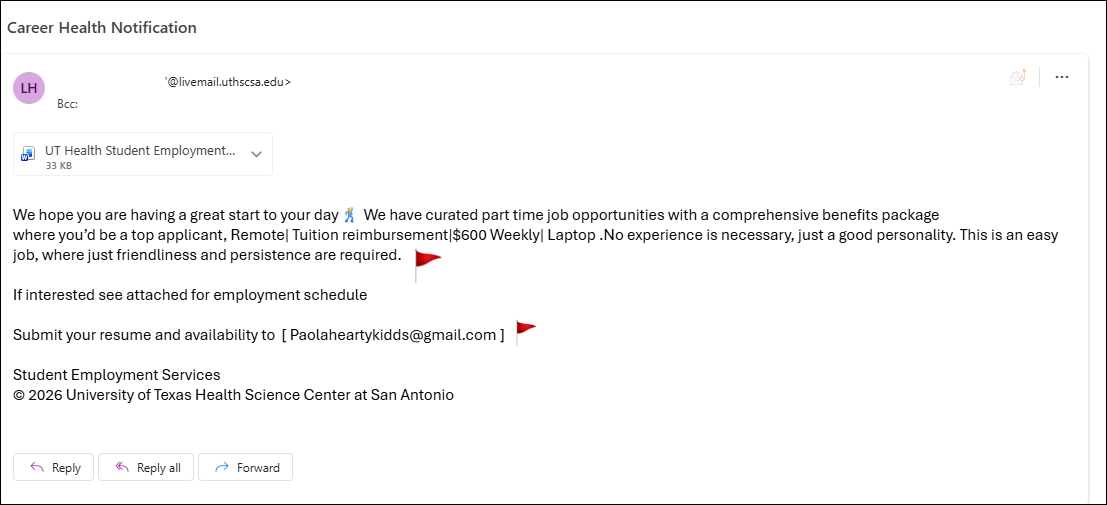
This email below has been confirmed as malicious or fraudulent by the Information Security department. If you have received this phishing email, do not open any attachments or follow the link(s) in the message; simply delete the email.The following email, presented as a Career Health Notification, exemplifies several common characteristics of phishing attempts. A close examination of its structure and content reveals multiple indicators that distinguish it from legitimate correspondence.
- Too Good To Be True Offer. $600/week, remote work, a laptop, and tuition reimbursement for a no-experience position is unrealistic. Scammers exploit emotional vulnerability, such as the need for a job, by mimicking HR departments or major health organizations to create false urgency.
- Suspicious Attachment. Unsolicited attachments are one of the most common malware delivery methods. The attachment may contain a virus, ransomware, or a fake form designed to collect your personal data.
- Vague Job Description. There is no actual job title, role, or responsibilities described in this email, nor is any company name provided. Legitimate job offers include clear, specific details about the position and the organization.
- No Verifiable Contact Information. No company website, physical address, or phone number were provided. Official correspondence would not be sent from a @gmail.com account, as legitimate organizations use verified company domains.
- Personal Information Collection via Gmail. The email instructs recipients to send their resumes to a @gmail.com address. This is a common tactic used to collect sensitive personal information, such as your full name, address, phone number, and employment history, which can be used for identity theft or sold to third parties.
What to Do If You Received This Email
- Do NOT open the attachment or click any links within the email.
- Do NOT send your resume or any personal information to the provided email address.
- Report the email: Use the built-in “Report Phish” button.”