Fake “Work-Study Opportunities for UTH Students” Phishing Email
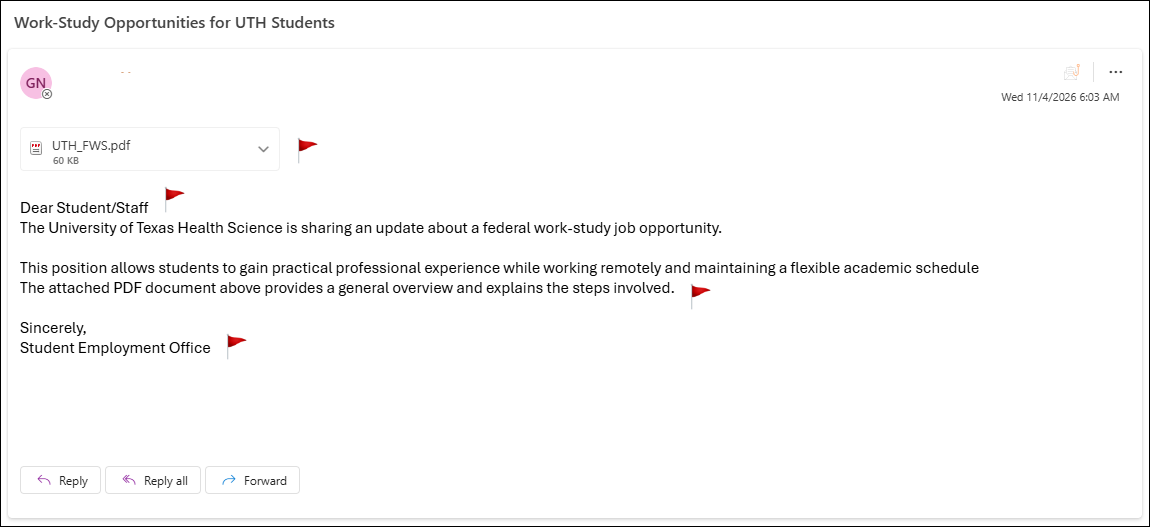
This email below has been confirmed as malicious or fraudulent by the Information Security department. If you have received this phishing email, do not open any attachments or follow the link(s) in the message; simply delete the email.The email below, subject-lined “Work-Study Opportunities for UTH Students,” was sent from a compromised account and offers a remote federal work-study position through an attached PDF. While it appears to come from a university office, it exhibits several common phishing red flags. An analysis is provided below.
Red Flags:
- Sent from a compromised, legitimate account: This email did not come from a spoofed or external address. It was sent from a real account that has been compromised, which can help it bypass sender-reputation filters and appear more trustworthy than a typical phishing email.
- Generic greeting: “Dear Student/Staff” addresses no one by name and doesn’t even commit to an audience, a hallmark of mass phishing emails rather than genuine correspondence from an employment office.
- Appealing but vague opportunity: The message promises remote work, practical experience, and a flexible schedule, but names no employer, department, job title, pay, or deadline. The goal is to make the offer sound attractive while giving nothing that can be verified.
- Suspicious PDF attachment: The email relies entirely on “UTH_FWS.pdf” to explain the opportunity and “the steps involved.” PDFs are a common way to deliver malicious links or malware, and legitimate work-study information is normally posted on an official website or sent through a verified portal.
- Inaccurate organization name: The email refers to “The University of Texas Health Science,” which is not the institution’s proper name. Official communications use the correct, full name of the university.
- Generic sign-off with no contact information: “Student Employment Office” lists no name, phone number, or website for verification, which is typical of phishing emails impersonating internal departments.
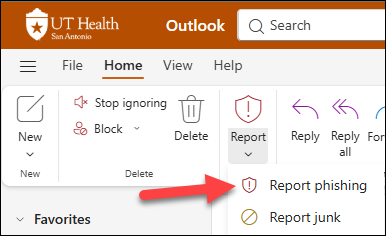
What to do: Do not open any attachments. Click the “Report Phish” button in your email client to alert your IT/security team.